
3.5 KiB
title: Radio
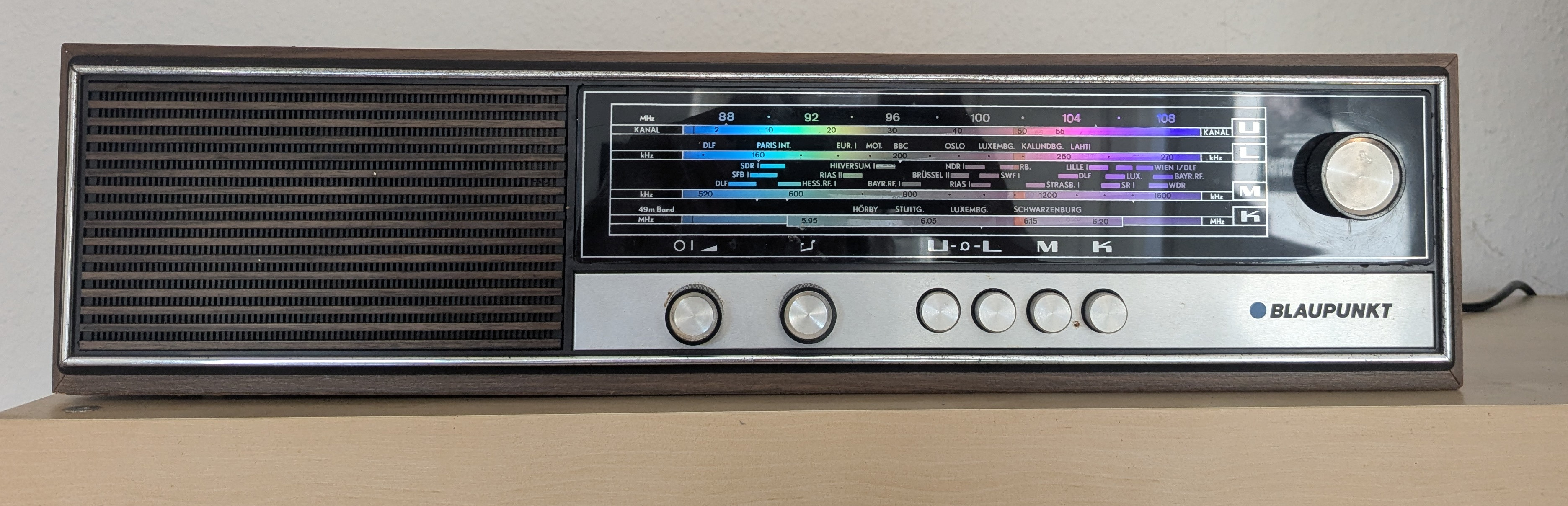 I got an Madeira 7.621.250 (to get some schematics you may wont to look at Madeira 7.622.250). I got an Pi 3 B+ with an HiFiBerry AMP 2. I soldered two cables to the existing solder joints on the speaker. This makes it possible to reverse the modifications I made with the PI, as it did not damage the “original” radio. I then screwed these cables, as well as the cables from a 12 V power supply (make sure it has sufficient amperage), into the AMP2's luster terminals. I also connected an LM2596S module to the 12 V power supply, which I later used for the neon pixels. Presumably, the few WS2812 LEDs should even be able to be supplied with sufficient power by the PI itself.
The radio has two light bulbs that are used for backlighting the scaler. I attached two NeoPixel sticks with eight WS2812 5050 RGB LEDs (DEBO LED NP8 2) to the light bulb mounts, also in such a way that the original light bulbs are not damaged. I connected these to GPIO 12, making sure to note which GPIOs are used by the AMP2 and where a digital converter is still available. This completes the hardware modifications for the first version.
AMP2 and MPD Setup
There are a log of different tutorials how to connect the AMP2 to the PI. For me the following steps works:
Edit the /boot/firmware/config.txt file by disabeld the audio=on and add the amp overlay:
# Enable audio (loads snd_bcm2835)
//dtparam=audio=on
dtoverlay=hifiberry-amp2
with this change (and after a restart) i could run aplay -l and got the following output:
**** List of PLAYBACK Hardware Devices ****
card 0: vc4hdmi [vc4-hdmi], device 0: MAI PCM i2s-hifi-0 [MAI PCM i2s-hifi-0]
  Subdevices: 1/1
  Subdevice #0: subdevice #0
card 1: sndrpihifiberry [snd_rpi_hifiberry_dacplus], device 0: HiFiBerry DAC+ HiFi pcm512x-hifi-0 [HiFiBerry DAC+ HiFi pcm512x-hifi-0]
  Subdevices: 1/1
  Subdevice #0: subdevice #0
The next step was to install the MPD by calling sudo apt-get install mpd. To allow the MPD to connect to the pipewrie it need to run in the user account, so I enabled and start it with the following commands:
systemctl disable mpd
systemctl stop mpd
systemctl --user enable mpd
systemctl --user start mpd
inside the mpd config /etc/mpd.conf i enabled the audio output for pulse/pipewire
audio_output {
	type		"pulse"
	name		"My Pulse Output"
##	server		"remote_server"		# optional
##	sink		"remote_server_sink"	# optional
##	media_role	"media_role"		#optional
}
and change the path to my mp3 files. As MPD Client i use rmpc on linux as cli client and M.A.L.P from fdroid for android. And also a Light switch.
Setup Neonpixel
I want that the Radio turn the radio just on if the MPD is playing something. So i use this python script that will show and rainbowl animation if the mpd is currenlty playing and turn the leds of if the music is paused for more than one minute.